Wishlist: the wish list for your online store.
A favourites button in your brand that your customers use without signing up. They save, organise and share what they like in your store, and you know what they want. For PrestaShop, WooCommerce, Shopify or any ecommerce.

Wicker bag
€89.00The problem
The usual wishlist brings no one back.
Almost every store has one, and almost nobody uses it. It isn't a design flaw: it's the concept. And it has two limits it can't get past.
- 01
To save, you have to sign up.
Only people already willing to leave their details save anything: exactly the customers who were coming back anyway. Everyone else doesn't sign up, doesn't save… and leaves all the same.
- 02
What they save, they forget.
A tucked-away list nobody opens again. Two weeks later they don't remember what they saved or which store they saw it in. And the product is lost.
Spaidoo turns it around: saving with no sign-up, and favourites that bring them back.
The solution
This is how the wishlist looks in your store.
Three pieces, and none of them touches your theme.
- 1
The floating button
Always at hand, in a corner: it shows the product they're looking at and saves it in one click. Next to it, the way into their favourites list.
- 2
The favourites button on the product page
Next to the buy button, a button to save the product. Whoever isn't buying today no longer leaves empty-handed.
- 3
Their library
A panel that opens over your store with everything they've saved, their lists and what they've seen. Without leaving your site.

Crono watch
€189.00Add to cartSave2A wishlist in your brand, not ours.
Your colour, your icon and whichever side of the screen you prefer. The wishlist adapts to your store, not the other way round. Try it:
They're the same options you'll have in your dashboard.




Everything your customer does with their favourites list.
Much more than a heart on the product page: a complete wish list, inside your store.
 01
01Save without signing up
One click from the floating button or the product page. No email, no password.
- 02
All in one place
Every saved product, with photo, price and priority, one click away next time.
- 03
Named lists
Christmas presents, the living-room makeover, the summer trip: each list, a shopping project.
 04
04Shared lists
With a ListIx, their family or friends join with a link and add products.
- 05
They vote on what to buy
A poll inside the list settles the “which of the two?” in your store.
- 06
Notes
The size, the colour, who it's for: the context of the purchase, next to the product.
- 07
History
What they look at is kept even if they don't save it. Days later, they find it in one click.
With or without an account, their favourites list is never lost.
Nobody has to sign up to get started. And once they identify themselves, what they saved goes with them.
- 01
No account
Already saving.
Their list stays in their browser. No sign-up, no password.
AnonymousThis browser - 02
Your store's customer
Their list follows them.
If they sign in to your store, their favourites go with their account: on their phone, on their computer, wherever they log in.
Your customer accountAll their devicesToday, with the PrestaShop module
- 03
Spaidoo account
No account at your store? Not a problem either.
They can save with their Spaidoo account in one click. Their favourites wait for them and bring them back.
Sign up once - 04
Linked
One list, everywhere.
If they link your store account with Spaidoo, their favourites sync: the same on your site and in their library.
SyncedToday, with the PrestaShop module
Try the wishlist in a real online store.
Verso is a demo store with the widget really running. When you arrive, an interactive guide walks you through what your customer will see: saving a product, their lists, their history and the alerts that bring them back.
- 1The guided tour walks you through it
- 2Save with one click
- 3Open their library and their alerts
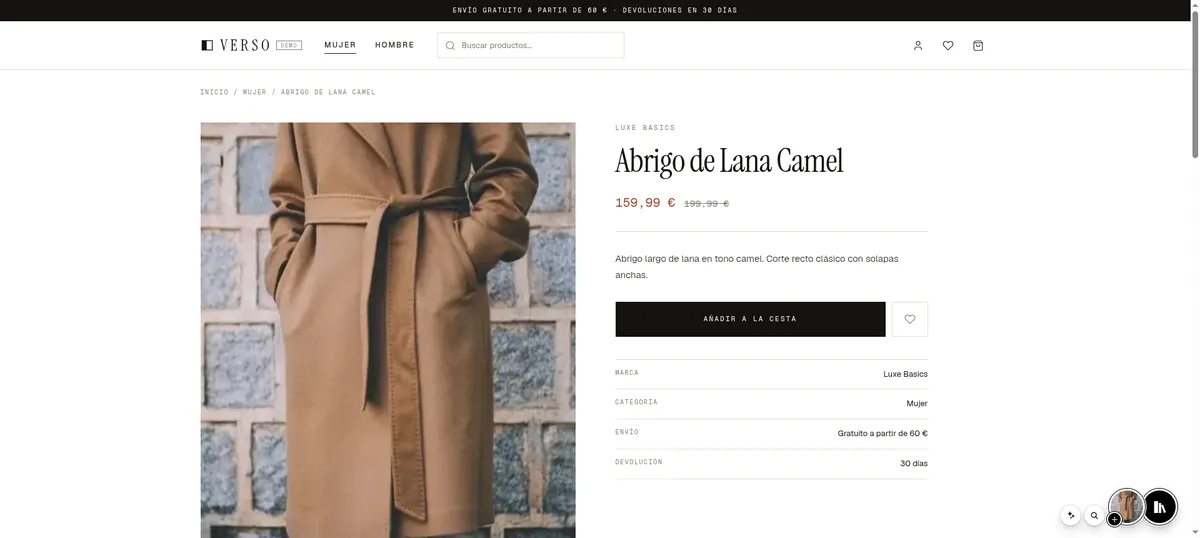
This is the favourites button
Save the coat with one click. No sign-up, no forms.
You decide when and where the wishlist shows up.
- 01
Off, test or live
Start in test mode: only you and people with the link see it. Match it to your brand and go live whenever you want.
- 02
Out of the cart and checkout
It accompanies your customer while they discover your store. In the cart and at checkout it disappears, so it doesn't get in the way.
- 03
Doesn't slow your store down
Your page loads just what it needs to show the button. The library and everything else only download when the visitor uses them.
- 04
No changes to your cookie banner
It assigns no identifier until the visitor uses it, and then only keeps what's needed to serve them.
Your wishlist, up and running today.
- 1
Create your free account
No card, no commitment. Registering your store takes a minute.
- 2
Connect it to your store
With your platform's module or with one line of code. Nothing to change in your theme, nothing to migrate.
- 3
Try it and publish it
Start in test mode, match it to your brand and open it to your customers when you're happy.
Whatever your online store is built with
PrestaShop
Official module
WooCommerce
Official plugin
Shopify
Snippet in your theme
Any eCommerce
One line of code
And you're in charge
Off
Your store downloads nothing.
Test
Only you and whoever has the link can see it.
Published
Visible to all your customers.
Questions about the wishlist for your online store.
01What is a wishlist and what is it for in an online store?
02How do I add a wishlist to my PrestaShop store?
03Is there a wishlist for WooCommerce and Shopify?
04Can my customers share their wish list?
05What happens to their favourites list if they switch phone or computer?
06Can I see which products my customers save?
The wishlist is free. All of it.
Everything you've seen is on the Starter plan, at no cost and with no card. What you pay for is talking to your customers: notifications, automatic alerts, mailing and carousels.